Happy New Year from everyone at IVT! Happy New Year from everyone at IVT!
I hope your new year has started well, and that we can help your organisation have a successful 2011. Maybe something in this month’s newsletter may help kick things along for you!
We’d love to discuss your plans for the year and see what assistance we can provide, so give us a call and let’s begin.
Andrew Minett
Director, Internet Vision Technologies
|
 Image tips for your website Image tips for your website
|
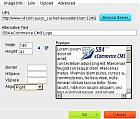
Large file sizes for your images can slow down your website, increase traffic, and impact usability.
While images enhance your website appearance, the larger the size of the file, the slower your website becomes. Image optimisation aims to strike a balance between image quality and file size. So, here’s our top image optimisation tips for IVT websites.
- Size your image correctly BEFORE you upload it to your website.
- Keep non-header images below 150 pixels high by 300 pixels wide.
- Keep header images below 300 pixels high by 750 pixels wide.
- Save your image at 50% - 75% of the original quality, but remember to check any text is still readable.
- Use GIF format for imageswith less than 256 colours, JPEG for others (e.g. photos).
- If the image is over 20K in size, optimise the image as a progressive jpeg.
- Do not change the width and height when inserting the image into a page using the insertion tool.
- Don’t put too many images on a page.
Contact us to request our 10 page user guide on Image Optimisation!
Common image sizes can greatly improve the usability of your website.
You may not have noticed it, but graphic intensive website such as The Age tend to have a few uniform image sizes that are used throughout the site. This makes your site more consistent for visitors, helping increase usability.
We recommend having 2 or 3 sizes such as a thumbnail size, a mid-range size and a larger size. Common sizes used by The Age site include:
- 60 x 50 pixels
- 172 x 115 pixels
- 420 x 277 pixels
|
Deleting Duplicate Contacts
|
With so many useful ways to add contacts within IVT’s web applications, occasionally you may find you have duplicated people or companies in your Contacts or Members database. The dilemma then becomes whether or not to delete one of the contacts - and if so, which one.
One of the great features of our applications is the integration between the different modules. So an event registration, sales order, and professional development activity can all link to the same contact details. This allows you to better understand your relationship with your contacts, presents a more professional approach to the contacts, and provides better opportunity for target marketing. However, if you delete a contact the other modules no longer know the contact details. This may result for example in the events module showing someone attended an event, but not being able to display who it was.
Luckily we've built functionality to help you find out if a contact has been used elsewhere. If you try to delete a contact and it has been used in another module, you will be warned and given a link to where that contact has been used. That way, you can decide whether you want to continue to delete the contact and to remove the contact's details from the other modules, or if you want to cancel the deletion and keep the contact in your application. This warning is a great way of helping you decide whether or not to remove a duplicate contact.
Need further advice? Contact our support desk.
|
Order Module with Reporting
|
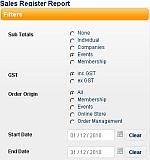 IVT’s new Order Module allows you to not only capture order details, but manage exceptions and view essential financial details as well. You can identify incomplete orders, and view refund details. It also provides inbuilt reports such as “Daily Sales”, “Debtors” and “Sales Register” which you can view on your website or export. IVT’s new Order Module allows you to not only capture order details, but manage exceptions and view essential financial details as well. You can identify incomplete orders, and view refund details. It also provides inbuilt reports such as “Daily Sales”, “Debtors” and “Sales Register” which you can view on your website or export.
If you’re still using the old orders module, contact us for a demonstration of the new module, and to discuss your upgrade path.
|
SB4 eCommerce CMS – Product Catalogue / Online Store
|
 Internet research on products is a key tool used by consumers and businesses as part of their pre-purchase decision making. Having detailed, relevant information on your website about your products allows you to communicate controlled information to them. The more product information you provide on your website, the less likely they’ll spend valuable time searching alternative sources that could lead to negative word-of-mouth information or competitor sites. Give them data sheets, show them product variations, provide manuals – get your information out there! Internet research on products is a key tool used by consumers and businesses as part of their pre-purchase decision making. Having detailed, relevant information on your website about your products allows you to communicate controlled information to them. The more product information you provide on your website, the less likely they’ll spend valuable time searching alternative sources that could lead to negative word-of-mouth information or competitor sites. Give them data sheets, show them product variations, provide manuals – get your information out there!
IVT recognises that product lines can vary greatly, and whether you have several products, or several thousand products, you should be able to cost-effectively provide product information online, whether or not you choose to sell it there.
SB4 eCommerce CMS allows you to construct an Online Store to suit your needs – with or without online purchasing. Great store features could include:
- Different product lines, with extensive categorisation.
- Customisable product variations, with different pricing available.
- Multiple documents for each product to suit your needs – e.g. marketing information, installation instructions, data safety sheets etc.
- Version control for each document.
- Online purchasing with multiple payment gateways (e.g. Credit Card, PayPal).
- Promotional campaign voucher codes.
- Gift vouchers.
- Customer reward systems, including earning discounts for future purchases.
- Quotation requests.
- Various freight options including:
- Simple handling charge like cost per item or per kilogram
- Australia Post calculation based on weight, number of items and start and finish postcodes
- Freight region calculations suitable for courier deliveries.
- Branding, colour scheme and layout to suit your business needs.
And that’s just the store features! With 87 functional modules currently available, we can add the extra functionality your business needs including eMarketing, surveys, event management, restricted customer access, project management, news and social networking.
Contact us for more information.
|
|
Internet Vision Technologies, Level 1, 520 Dorset Road, Croydon South, Victoria
We respect your right to privacy - view our policy
|
|
|